
Table of Contents
9. REST and Python: Building APIs
10. REST and Python: Tools of the Trade
11. Conclusion
Prerequisites
pip (for installing libraries like requests, Flask, FastAPI, etc.)APIs are mechanisms that enable two software components to communicate with each other using a set of definitions and protocols. For example, the weather bureau’s software system contains daily weather data. The weather app on your phone “talks” to this system via APIs and shows you daily weather updates on your phone.
API stands for Application Programming Interface. In the context of APIs, the word Application refers to any software with a distinct function. Interface can be thought of as a contract of service between two applications. This contract defines how the two communicate with each other using requests and responses. Their API documentation contains information on how developers are to structure those requests and responses.
APIs can be categorized in several ways, but one common approach is based on who has access to them. The main categories include:
2. Public APIs (Open APIs)
3. Partner APIs
API architecture is usually explained in terms of client and server. The application sending the request is called the client, and the application sending the response is called the server. So in the weather example, the bureau’s weather database is the server, and the mobile app is the client.
There are four different ways that APIs can work depending on when and why they were created.
Consider a book-distributing company. Instead of building a full-fledged cloud app for bookstore clerks to check inventory — which could be costly, platform-dependent, and time-consuming to maintain — the company could expose a REST API for stock availability.
The advantages of this approach are significant:
This example highlights how APIs not only streamline operations but also create value for both the provider and its customers.
These APIs use Simple Object Access Protocol. Client and server exchange messages using XML. This is a less flexible API that was more popular in the past.
These APIs are called Remote Procedure Calls. The client completes a function (or procedure) on the server, and the server sends the output back to the client.
Websocket API is another modern web API development that uses JSON objects to pass data. A WebSocket API supports two-way communication between client apps and the server. The server can send callback messages to connected clients, making it more efficient than REST API.
These are the most popular and flexible APIs found on the web today. The client sends requests to the server as data. The server uses this client input to start internal functions and returns output data back to the client. Let’s look at REST APIs in more detail below.
The web is overflowing with data — and much of it is up for grabs if you know how to ask. Platforms like YouTube, GitHub, and X — Formerly Twitter( expose their data to developers through APIs (Application Programming Interfaces). Among the many ways to design APIs, the REST (Representational State Transfer) architecture style has become the go-to standard.
Python makes working with REST APIs especially painless. Whether you want to consume existing APIs (pulling data into your projects) or build your own REST API from scratch, Python has the right tools to make it happen.
By the end of this tutorial, you’ll understand:
requests library, including basic GET and POST examplesREST (Representational State Transfer) is a set of architectural constraints designed to create efficient, reliable, and scalable distributed systems.
At its core, REST treats everything as a resource (for example, a document, image, or user record) that can be accessed and manipulated through standardized, language-agnostic client–server interactions.
An API is considered RESTful if it follows these constraints. In practice, though, many HTTP APIs are labeled “RESTful” even if they don’t strictly comply. For beginners, you can think of a REST API simply as an HTTP service that can be called using standard web tools and libraries.
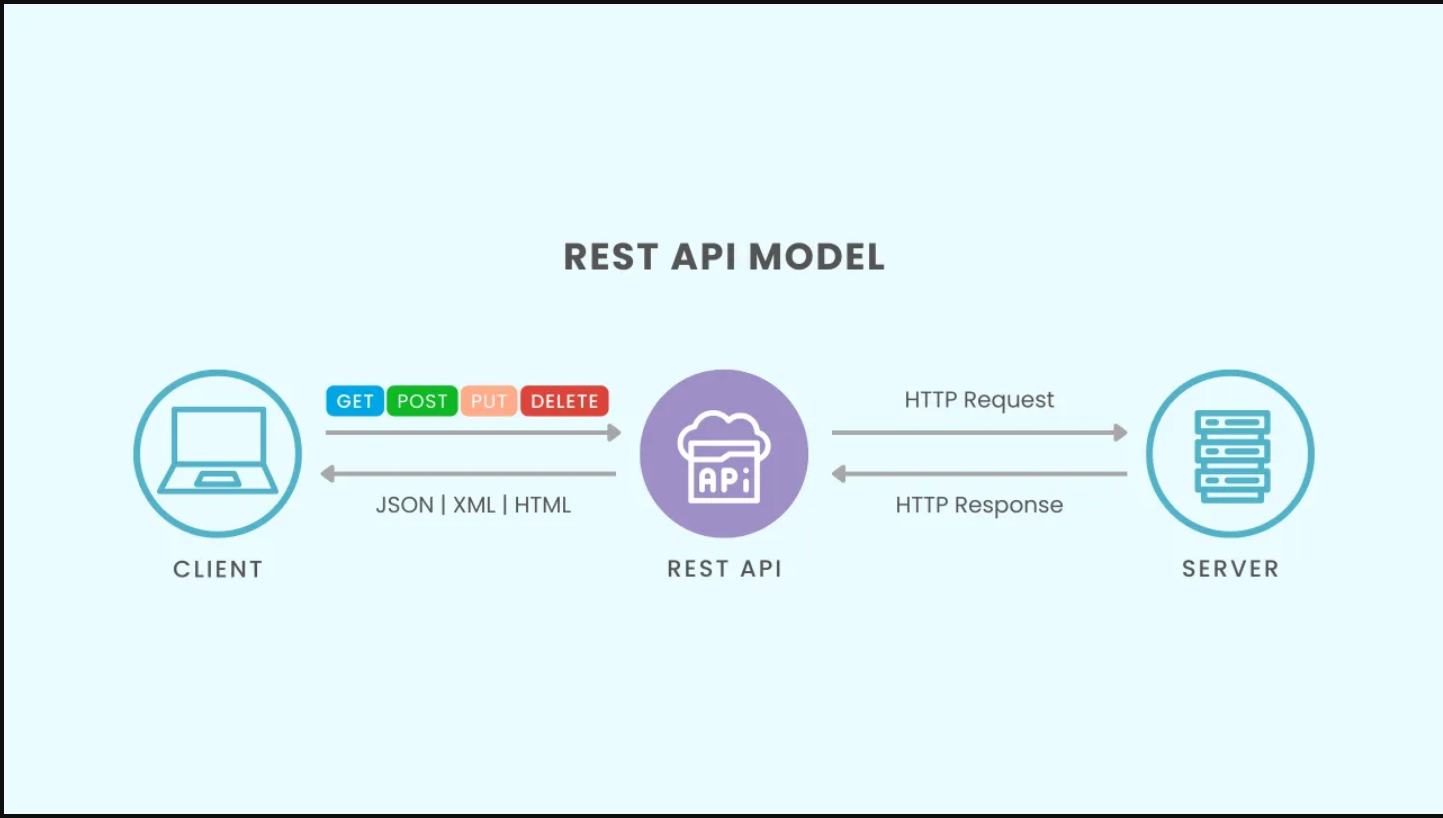
Important: REST is not a strict specification. It’s a set of guidelines and principles for designing networked systems.
REST APIs offer four main benefits:
APIs are used to integrate new applications with existing software systems. This increases development speed because each functionality doesn’t have to be written from scratch. You can use APIs to leverage existing code.
Entire industries can change with the arrival of a new app. Businesses need to respond quickly and support the rapid deployment of innovative services. They can do this by making changes at the API level without having to re-write the whole code.
APIs present a unique opportunity for businesses to meet their clients’ needs across different platforms. For example, maps API allows map information integration via websites, Android,iOS, etc. Any business can give similar access to their internal databases by using free or paid APIs.
The API acts as a gateway between two systems. Each system is obliged to make internal changes so that the API is not impacted. This way, any future code changes by one party do not impact the other party.
A REST web service is simply a web service that follows REST’s architectural constraints. These services make their data available to external applications through an API (Application Programming Interface).
A REST API provides access to this data via public web URLs, typically returning results in formats like JSON or XML.
For example, GitHub exposes its data through a REST API. Here’s one of its endpoints:
https://api.github.com/users/octocat/reposThis URL gives you access to information about a specific GitHub user. To interact with a REST API, you send an HTTP request to a particular URL (called an endpoint) and then process the response the server sends back.
For instance, a simple GET request to the GitHub API endpoint:
https://api.github.com/users/octocatoctocat — including details like their profile name, bio, and number of public repositories.REST APIs rely on HTTP methods (also called verbs) such as GET, POST, and DELETE to determine what kind of action to perform on a resource.
A resource is any piece of data the web service exposes — for example, a user profile, an image, or a list of products. The HTTP method specifies how the API should interact with that resource: retrieve it, create it, update it, or remove it.
Although the HTTP standard defines many methods, the following five are the most commonly used in REST APIs:

The following table lists HTTP request methods and their categorization in terms of safety, cacheability, and idempotency.

When a REST API processes an HTTP request, it sends back an HTTP response. Every response includes a status code, which tells you the outcome of the request.
Status codes are crucial because they let applications decide what to do next — for example, show a success message, retry the request, or handle an error gracefully.
Here are the most common status codes you’ll see when working with REST APIs:

These ten status codes represent only a small subset of the available HTTP status codes. Each code belongs to a category based on the first digit:
HTTP status codes come in handy when working with REST APIs as you’ll often need to perform different logic based on the results of the request.
A REST API provides a set of public URLs that client applications can use to access and interact with the resources of a web service. These URLs are called endpoints. Each endpoint corresponds to a specific function or resource within the API.
For example, consider a library management system. Below is a table showing API endpoints for managing the Book resource hypothetical CRM system, which represents the books available in the library:

Each of the endpoints above performs a different action based on the HTTP method.
Note: The base URL for the endpoints has been omitted here for brevity. In practice, you’ll need the full URL to access an API endpoint.
For example:
https://api.example.com/booksThis is the full URL for the
booksresource. The base URL is everything before/books(in this case,https://api.example.com).
You’ll notice that some endpoints include <book_id> at the end. This notation means you need to append a numeric book ID to the URL to tell the REST API exactly which book you want to work with.
Also, keep in mind that the endpoints shown above represent just one resource in the system. In a real-world, production-ready REST API, there could be dozens or even hundreds of endpoints, each managing different resources and operations within the web service.
Note: An endpoint shouldn’t contain verbs. Instead, you should select the appropriate HTTP methods to convey the endpoint’s action. For example, the endpoint below contains an unneeded verb:
GET /getBooksHere, get is included in the endpoint when it isn’t needed. The HTTP method GET already provides the semantic meaning for the endpoint by indicating the action. You can remove get from the endpoint:
GET /booksThis endpoint contains only a plural noun, and the HTTP method GET communicates the action.
Sometimes a resource exists within another resource, creating a hierarchy. For instance, a library system might manage chapters nested under books. Here’s how the endpoints could look:

With these endpoints, you can manage chapters for a specific book in the system.
This isn’t the only way to structure nested resources. Some developers prefer using query strings to access a nested resource. A query string lets you send additional parameters with your HTTP request.
For example, you could fetch chapters for a specific book using a query string like this:
GET /chapters?book_id=214Here, the query string parameter book_id=214 specifies that you want to retrieve only the chapters belonging to book 214. This approach can be useful for filtering or searching, but it’s important to balance readability and RESTful conventions when designing your API.
Note: It’s very unlikely that a REST API will remain unchanged throughout the life of a web service. Resources evolve, and endpoints may need updates to reflect these changes. This is where API versioning comes in — it allows you to modify your API without breaking existing integrations.
There are several popular strategies for versioning an API, and the right choice depends on your specific requirements:
URI versioning: Include the version number in the URL, e.g.,
/v1/books.HTTP header versioning: Specify the version in request headers.
Query string versioning: Use query parameters like
?version=1.Media type versioning: Include version information in the
Content-TypeorAcceptheaders.Regardless of the method, API versioning is essential for ensuring your API can adapt to changing requirements while continuing to support existing users.
Now that you’ve covered endpoints, in the next section you’ll look at some options for formatting data in your REST API.
When designing a REST API, you need to decide how your data will be formatted. Two common options are XML and JSON. Historically, XML was widely used with SOAP APIs, but JSON has become the preferred format for REST APIs because it’s lightweight, easy to read, and integrates seamlessly with JavaScript and most programming languages.
To illustrate, here’s an example of a book resource formatted as XML:
<?xml version="1.0" encoding="UTF-8"?>
<book>
    <title>Deep Learning Essentials</title>
    <page_count>420</page_count>
    <pub_date>2022-08-10</pub_date>
    <authors>
        <author>
            <name>Aurélien Géron</name>
        </author>
        <author>
            <name>Francois Chollet</name>
        </author>
    </authors>
    <isbn13>978-1617296864</isbn13>
    <genre>Technology</genre>
</book>
Here, the XML structure uses nested elements to represent hierarchical data, such as multiple authors for a book. While XML is very expressive, it tends to be more verbose than JSON, which is why many REST APIs today favor JSON.
Now, here’s the same book represented in JSON:
{
    "title": "Deep Learning Essentials",
    "page_count": 420,
    "pub_date": "2022-08-10",
    "authors": [
        {"name": "Aurélien Géron"},
        {"name": "Francois Chollet"}
    ],
    "isbn13": "978-1617296864",
    "genre": "Technology"
}
JSON stores data in key-value pairs, similar to a Python dictionary. Like XML, JSON supports nested structures, allowing you to model complex relationships, such as multiple authors for a single book.
While neither JSON nor XML is inherently “better,” JSON is generally preferred in REST APIs, especially when paired with front-end frameworks like React, Vue, or Angular. Its simplicity, readability, and native compatibility with JavaScript make it the go-to choice for modern web development.
Once you’ve chosen a data format, the next step is deciding how your API will respond to HTTP requests. All responses should follow a consistent structure and include the appropriate HTTP status code.
Let’s look at an example of a GET request to /books in a library API. We’ll examine the raw HTTP request and response rather than using a library like requests for clarity:
HTTP Request:
GET /books HTTP/3
Host: api.example.com
This request has four parts:
GET – the HTTP method./books – the API endpoint.HTTP/1.1 – the HTTP version.Host: api.example.com – the API host.HTTP Response:
HTTP/3 200 OK
Content-Type: application/json
[...]
[
{
"id": 1,
"title": "Deep Learning Essentials",
"author": "Aurélien Géron",
"published_year": 2022,
"isbn": "978-1617296864",
"genre": "Technology"
},
{
"id": 2,
"title": "Clean Code",
"author": "Robert C. Martin",
"published_year": 2008,
"isbn": "978-0132350884",
"genre": "Software"
},
{
"id": 3,
"title": "Artificial Intelligence: A Modern Approach",
"author": "Stuart Russell",
"published_year": 2016,
"isbn": "978-0134610993",
"genre": "Education"
}
]Here’s what you can learn from this response:
application/json, telling the client to parse the response as JSON.By maintaining a consistent response structure, your API becomes predictable, reliable, and easier to consume for developers.
Additionally, always include an appropriate HTTP status code. For a successful GET request, return 200 OK — this communicates clearly that the request was processed successfully and the data is valid.
Take a look at another GET request, this time for a single book:
HTTP Request:
GET /books/1 HTTP/3
Host: api.example.com
This request queries the API for book with ID 1.
HTTP Response:
HTTP/3 200 OK
Content-Type: application/json
{
    "id": 1,
    "title": "Deep Learning Essentials",
    "author": "Aurélien Géron",
    "published_year": 2022,
    "isbn": "978-1617296864",
    "genre": "Technology"
}
Here, the response contains a single JSON object with the book’s data. Since it’s a single object, there’s no need to wrap it in a list. As before, the 200 OK status code confirms that the request was successful.
Note: A
GETrequest should never modify an existing resource. If the request contains data, then this data should be ignored and the API should return the resource unchanged.
Next, let’s look at a POST request to add a new book:
HTTP Request:
POST /books HTTP/3
Host: api.example.com
Content-Type: application/json
{
    "title": "Python for Data Analysis",
    "author": "Wes McKinney",
    "published_year": 2018,
    "isbn": "978-1491957660",
    "genre": "Data Science"
}
This POST request includes JSON data for the new book and sets the Content-Type header to application/json so the API knows how to interpret the request. The API will create a new book using this data.
HTTP Response:
HTTP/3 201 Created
Content-Type: application/json
{
    "id": 4,
    "title": "Python for Data Analysis",
    "author": "Wes McKinney",
    "published_year": 2018,
    "isbn": "978-1491957660",
    "genre": "Data Science"
}
Key points from this response:
id generated by the API. Including the ID is important so the client can reference or update the resource later.Note: It’s important to always send back a copy of a resource when a user creates it with
POSTor modifies it withPUTorPATCH. This way, the user can see the changes that they’ve made.
Now, let’s look at a PUT request to update a book:
HTTP Request:
PUT /books/4 HTTP/3
Host: api.example.com
Content-Type: application/json
{
    "title": "Advanced Python Programming",
    "author": "Joe Marini",
    "published_year": 2021,
    "isbn": "978-1492051376",
    "genre": "Programming"
}
This request uses the id of the previously created book to replace all its fields with new data. Remember, PUT replaces the entire resource, so every field should be included in the request.
HTTP Response:
HTTP/3 200 OK
Content-Type: application/json
{
    "id": 4,
    "title": "Advanced Python Programming",
    "author": "Joe Marini",
    "published_year": 2021,
    "isbn": "978-1492051376",
    "genre": "Programming"
}
The 200 OK status code confirms that the update was successful, and the response body returns the updated book.
The same concept applies to a PATCH request, which is used to update only part of a resource:
HTTP Request:
PATCH /books/4 HTTP/3
Host: api.example.com
Content-Type: application/json
{
    "published_year": 2022,
    "genre": "Software Development"
}
This request updates only the published_year and genre fields of the book with ID 4, leaving all other fields unchanged.
HTTP Response:
HTTP/3 200 OK
Content-Type: application/json
{
    "id": 4,
    "title": "Advanced Python Programming",
    "author": "Joe Marini",
    "published_year": 2022,
    "isbn": "978-1492051376",
    "genre": "Software Development"
}
The response returns a full copy of the book, but only the fields included in the PATCH request (published_year and genre) have been updated.
Finally, let’s see how a REST API should respond to a DELETE request. Here’s an example to remove a book:
HTTP Request:
DELETE /books/4 HTTP/3
Host: api.example.com
This request instructs the API to delete the book with ID 4.
HTTP Response:
HTTP/3 204 No ContentThe response includes only the 204 No Content status code, which indicates that the operation was successful but no content is returned. This makes sense because the book has been deleted — there’s no need to send it back.
Even the best-designed APIs can encounter errors. It’s important to define a consistent error response format that includes both a descriptive message and the appropriate HTTP status code.
For example, consider a request for a resource that doesn’t exist in the API:
HTTP Request:
GET /magazines HTTP/3
Host: api.example.com
Here, the client requests the /magazines endpoint, which doesn’t exist.
HTTP Response:
HTTP/3 404 Not Found
Content-Type: application/json
{
    "error": "The requested resource was not found."
}Next, consider an error response when a client sends an invalid request:
HTTP Request:
POST /books HTTP/3
Host: api.example.com
Content-Type: application/xml
<?xml version="1.0" encoding="UTF-8"?>
<book>
    <title>Python Crash Course</title>
    <author>Eric Matthes</author>
    <published_year>2019</published_year>
    <genre>Programming</genre>
</book>
HTTP Response:
HTTP/3 415 Unsupported Media Type
Content-Type: application/json
{
    "error": "The application/xml media type is not supported."
}Invalid Data in Correct Format:
Even if the JSON is valid, the API might reject unexpected or unsupported fields:
HTTP Request:
POST /books HTTP/3
Host: api.example.com
Content-Type: application/json
{
    "title": "Python Crash Course",
    "author": "Eric Matthes",
    "pages": 550,
    "extraField": "Invalid data"
}
HTTP Response:
HTTP/3 422 Unprocessable Entity
Content-Type: application/json
{
    "error": "Request had invalid or missing data."
}Responding to requests — both successful and erroneous — is one of the most important jobs of a REST API. An intuitive API with accurate responses makes it much easier for developers to build applications around your web service. Fortunately, several Python web frameworks handle much of the complexity of processing HTTP requests and returning structured responses. In the next section, we’ll explore three popular frameworks that simplify building REST APIs.
In this section, we’ll explore three popular Python frameworks for building REST APIs. Each framework has its strengths and trade-offs, so you’ll need to decide which one best suits your project. To demonstrate, we’ll build a similar API in each framework that manages a collection of books.
Each book will have the following fields:
These fields store essential information about each book.
Most of the time, REST APIs fetch data from a database, but connecting to a database is beyond the scope of this tutorial. For our examples, we’ll store the data in a Python list, except for the Django REST framework example, which uses Django’s built-in SQLite database.
This approach keeps the examples simple and focused, letting you learn the framework mechanics before adding database complexity.
Note: It’s a good practice to create separate folders for each framework example to keep the source files organized. Additionally, you should use Python virtual environments for each project to isolate dependencies and avoid conflicts between frameworks.
To keep things consistent, we’ll use books as the main endpoint for all three frameworks. We’ll also use JSON as the data format across the examples.
Now that the background is set, let’s dive into building a REST API in Flask.
Flask is a lightweight Python microframework for building web applications and REST APIs. It provides a solid foundation while giving you the flexibility to structure your application the way you want. At its core, Flask handles HTTP requests and routes them to the appropriate function in your application.
For our example, the API will manage a collection of books, each with the fields:
titleauthorpagesWe’ll store these books in a Python list for simplicity, allowing us to focus on Flask mechanics without worrying about databases.
For example, instead of using:
@app.get("/books")
@app.post("/books")
in Flask 1.x, you should use:
@app.route("/books")
@app.route("/books", methods=["POST"])
This handles GET and POST requests to the /books endpoint in older Flask versions.
# app.py
from flask import Flask, request, jsonify

app = Flask(__name__)

books = [
    {"id": 1, "title": "Python Crash Course", "author": "Eric Matthes", "pages": 550},
    {"id": 2, "title": "Automate the Boring Stuff", "author": "Al Sweigart", "pages": 600},
    {"id": 3, "title": "Fluent Python", "author": "Luciano Ramalho", "pages": 790},
]

def _find_next_id():
    return max(book["id"] for book in books) + 1

@app.get("/books")
def get_books():
    return jsonify(books)

@app.post("/books")
def add_book():
    if request.is_json:
        book = request.get_json()
        book["id"] = _find_next_id()
        books.append(book)
        return book, 201
return {"error": "Request must be JSON"}, 415id automatically, and returns a 201 Created response. If the request is not JSON, it returns a 415 Unsupported Media Type error.Note: This Flask application includes functions to handle only two types of requests to the API endpoint,
/countries. In a full REST API, you’d want to expand this to include functions for all the required operations.
You can try out this application by first installing Flask with pip:
$ python -m pip install flaskOnce installed, save the code in a file called app.py. To run the Flask application, you need to set an environment variable called FLASK_APP pointing to app.py. This tells Flask which file contains your application.
On macOS or Linux, run:
$ export FLASK_APP=app.pyOptionally, you can enable debug mode to get helpful error messages and automatic reloads whenever you change your code:
$ export FLASK_ENV=developmentNote: The above commands work on macOS or Linux. If you’re running this on Windows, then you need to set
FLASK_APPandFLASK_ENVlike this in the Command Prompt:
C:\>set FLASK_APP=app.py
C:\>set FLASK_ENV=development
Now FLASK_APP and FLASK_ENV are set inside the Windows shell.
With all environment variables set, you can start the Flask development server by running:
$ flask runYou’ll see output like this:
* Serving Flask app "app.py" (lazy loading)
* Environment: development
* Debug mode: on
* Running on http://127.0.0.1:5000/ (Press CTRL+C to quit)
This launches a server running your application. Open your browser and navigate to http://127.0.0.1:5000/books, and you’ll see the following JSON response:
[
    {"id": 1, "title": "Python Crash Course", "author": "Eric Matthes", "pages": 550},
    {"id": 2, "title": "Automate the Boring Stuff", "author": "Al Sweigart", "pages": 600},
    {"id": 3, "title": "Fluent Python", "author": "Luciano Ramalho", "pages": 790}
]
This response contains the three books defined at the start of app.py.
Here’s how it works in the code:
@app.get("/books")
def get_books():
    return jsonify(books)
The @app.get() decorator connects GET requests to the get_books() function. When you access /books, Flask calls this function to handle the request and return a JSON response with all the book data.
In the code above, get_books() takes books, which is a Python list, and converts it to JSON using jsonify(). This JSON is then returned in the HTTP response.
The helper function _find_next_id() determines the ID for the new book:
def _find_next_id():
    return max(book["id"] for book in books) + 1
This function uses a generator expression to select all existing book IDs and then finds the largest value. Adding 1 gives the next available ID.
You can test this endpoint using curl from the command line to simulate a POST request:
$ curl -i http://127.0.0.1:5000/books \
-X POST \
-H 'Content-Type: application/json' \
-d '{"title":"Clean Code", "author":"Robert C. Martin", "pages":364}'
The response will look like this:
HTTP/3 201 CREATED
Content-Type: application/json
...
{"id": 4, "title":"Clean Code", "author":"Robert C. Martin", "pages":364}
Curl options to note:
-X specifies the HTTP method.-H sets an HTTP header.-d provides the request data.With these options, curl sends JSON data in a POST request, and the API returns 201 Created along with the JSON for the new book.
Another popular choice for building REST APIs in Python is Django REST framework (DRF). DRF is a plugin for Django that adds powerful REST API functionality on top of an existing Django project.
To use Django REST framework, you first need a Django project. If you already have one, you can integrate DRF directly. Otherwise, follow along to create a new project and add DRF.
Start by installing Django and Django REST framework:
$ python -m pip install Django djangorestframeworkOnce installed, create a new Django project:
$ django-admin startproject bookapiThis creates a bookapi folder in your current directory containing all the necessary files for the project. Next, create a new Django application to handle your books API. In Django, each app manages a distinct part of the project:
$ cd bookapi
$ python manage.py startapp books
This creates a books folder inside your project. Inside it, you’ll find the base files for the application.
Finally, tell Django about your new app. Open bookapi/settings.py and add "books" and "rest_framework" to INSTALLED_APPS:
INSTALLED_APPS = [
    "django.contrib.admin",
    "django.contrib.auth",
    "django.contrib.contenttypes",
    "django.contrib.sessions",
    "django.contrib.messages",
    "django.contrib.staticfiles",
    "rest_framework",
    "books",
]
The next step is to create a Django model to define the fields of your data. Inside the books application, update models.py:
# books/models.py
from django.db import models

class Book(models.Model):
    title = models.CharField(max_length=200)
    author = models.CharField(max_length=100)
    page_count = models.IntegerField(help_text="Number of pages")
    published_date = models.DateField()
This defines a Book model. Django will use this to create the database table and columns for your book data.
Run the following commands to update the database:
$ python manage.py makemigrations
Migrations for 'books':
  books/migrations/0001_initial.py
    - Create model Book
$ python manage.py migrate
Operations to perform:
Apply all migrations: admin, auth, contenttypes, books, sessions
Running migrations:
Applying contenttypes.0001_initial... OK
Applying auth.0001_initial... OK
Applying books.0001_initial... OKThese commands create a new database table for books.
The table starts empty, but it’s useful to have some initial data for testing DRF. You can use a Django fixture to load sample books. Save the following JSON as books.json inside the books directory:
[
    {
        "model": "books.book",
        "pk": 1,
        "fields": {
            "title": "Python Basics",
            "author": "David Amos",
            "page_count": 635,
            "published_date": "2021-03-16"
        }
    },
    {
        "model": "books.book",
        "pk": 2,
        "fields": {
            "title": "Data Science Fundamentals",
            "author": "Joanna Jablonski",
            "page_count": 512,
            "published_date": "2020-07-10"
        }
    },
    {
        "model": "books.book",
        "pk": 3,
        "fields": {
            "title": "Machine Learning 101",
            "author": "Dan Bader",
            "page_count": 400,
            "published_date": "2022-01-05"
        }
    }
]
This fixture gives you some initial book records for testing your API. You can later load it with:
$ python manage.py loaddata books.jsonThis JSON contains database entries for three books. Call the following command to load this data into the database:
$ python manage.py loaddata books.json
Installed 3 object(s) from 1 fixture(s)
This adds three rows to the database.
With that, your Django application is now set up and populated with initial data. You can start integrating Django REST framework.
Django REST framework converts Django models into JSON for your REST API using serializers. A serializer defines how to transform a model instance into JSON and which fields to include.
Create a file called serializers.py inside the books application. Add the following code:
# books/serializers.py
from rest_framework import serializers
from .models import Book

class BookSerializer(serializers.ModelSerializer):
    class Meta:
        model = Book
        fields = ["id", "title", "author", "page_count", "published_date"]
This BookSerializer subclasses serializers.ModelSerializer to automatically generate JSON from the Book model fields. By specifying the fields list, you control exactly which fields are exposed via the API.
Just like Django, Django REST framework uses views to query the database and display data via the API. Instead of manually writing each REST API view, you can subclass ModelViewSet, which comes with built-in views for common REST API operations.
Here’s a table of ModelViewSet actions with their equivalent HTTP methods for a books API:

ModelViewSet for the Book ResourceAs you can see, these actions map to the standard HTTP methods you’d expect in a REST API. You can override these actions in your subclass or add additional actions based on the requirements of your API.
Below is the code for a ModelViewSet subclass called BookViewSet. This class will generate the views needed to manage Book data. Add the following code to views.py inside the books application:
# books/views.py
from rest_framework import viewsets
from .models import Book
from .serializers import BookSerializer

class BookViewSet(viewsets.ModelViewSet):
    serializer_class = BookSerializer
    queryset = Book.objects.all()
In this class, serializer_class is set to BookSerializer and queryset is set to Book.objects.all(). This tells Django REST framework which serializer to use and how to query the database for this specific set of views.
Once the views are created, they need to be mapped to the appropriate URLs or endpoints. To do this, Django REST framework provides a DefaultRouter that will automatically generate URLs for a ModelViewSet.
Create a urls.py file in the books application and add the following code to the file:
# books/urls.py
from django.urls import path, include
from rest_framework.routers import DefaultRouter
from .views import BookViewSet

router = DefaultRouter()
router.register(r "books", BookViewSet)
urlpatterns = [
    path("", include(router.urls))
]
This code creates a DefaultRouter and registers BookViewSet under the books URL. This will place all the URLs for BookViewSet under /books/.
Finally, you need to update the project’s base urls.py file to include all the books URLs in the project. Update the urls.py file inside your project folder (e.g., bookapi/urls.py) with the following code:
# bookapi/urls.py
from django.contrib import admin
from django.urls import path, include

urlpatterns = [
    path("admin/", admin.site.urls),
    path("", include("books.urls")),
]
This puts all the URLs under /books/. Now you’re ready to try out your Django-backed REST API. Run the following command in the root bookapi directory to start the Django development server:
$ python manage.py runserverThe development server is now running. Go ahead and send a GET request to /books/ to get a list of all the books in your Django project:
$ curl -i http://127.0.0.1:8000/books/ -w '\n'Example response:
HTTP/3 200 OK
...
[
    {
        "id": 1,
        "title": "The Pragmatic Programmer",
        "author": "Andrew Hunt",
        "pages": 352
    },
    {
        "id": 2,
        "title": "Clean Code",
        "author": "Robert C. Martin",
        "pages": 464
    },
    {
        "id": 3,
        "title": "Effective Python",
        "author": "Brett Slatkin",
        "pages": 256
    }
]
Django REST framework sends back a JSON response with the three books you added earlier. The response above is formatted for readability, so your response may look slightly different.
The DefaultRouter you created in books/urls.py provides URLs for requests to all the standard API endpoints:
GET /books/ → list all booksGET /books/<id>/ → retrieve a single bookPOST /books/ → create a new bookPUT /books/<id>/ → update all fields of a bookPATCH /books/<id>/ → update some fields of a bookDELETE /books/<id>/ → remove a bookYou can try out a POST request to /books/ to create a new book in your Django project:
$ curl -i http://127.0.0.1:8000/books/ \
-X POST \
-H 'Content-Type: application/json' \
-d '{"title":"Python Crash Course", "author":"Eric Matthes", "pages":544}' \
-w '\n'
Example response:
HTTP/3 201 Created
content-type: application/json
...
{"id":4,"title":"Python Crash Course","author":"Eric Matthes","pages":544}
This creates a new Book with the JSON you sent in the request. Django REST framework returns a 201 Created status code along with the newly created book.
FastAPI is a Python web framework optimized for building APIs. It uses Python type hints and has built-in support for async operations. FastAPI is built on top of Starlette and Pydantic and is very performant.
Below is an example of a REST API for books built with FastAPI:
# app.py
from fastapi import FastAPI
from pydantic import BaseModel, Field

app = FastAPI()

def _find_next_id():
    return max(book.book_id for book in books) + 1

class Book(BaseModel):
    book_id: int = Field(default_factory=_find_next_id, alias="id")
    title: str
    author: str
    pages: int

books = [
    Book(id=1, title="The Pragmatic Programmer", author="Andrew Hunt", pages=352),
    Book(id=2, title="Clean Code", author="Robert C. Martin", pages=464),
    Book(id=3, title="Deep Learning", author="Ian Goodfellow", pages=775),
]

@app.get("/books")
async def get_books():
    return books

@app.post("/books", status_code=201)
async def add_book(book: Book):
    books.append(book)
    return book
This application uses FastAPI features to build a REST API for books, similar to how we handled countries in previous examples.
You can try this application by installing FastAPI with pip:
$ python -m pip install fastapiYou’ll also need to install uvicorn[standard], a server that can run FastAPI applications:
$ python -m pip install uvicorn[standard]Once both FastAPI and Uvicorn are installed, save the code above in a file called app.py. Run the following command to start a development server:
$ uvicorn app:app --reload
INFO: Uvicorn running on http://127.0.0.1:8000 (Press CTRL+C to quit)
The server is now running. Open up a browser and go to http://127.0.0.1:8000/books. You’ll see FastAPI respond with this:
[
    {
        "id": 1,
        "title":"The Pragmatic Programmer",
        "author":"Andrew Hunt",
        "pages":352
    },
    {
        "id": 2,
        "title":"Clean Code",
        "author":"Robert C. Martin",
        "pages":464
    },
    {
        "id": 3,
        "title":"Deep Learning",
        "author":"Ian Goodfellow",
        "pages":775
    }
]
FastAPI responds with a JSON array containing a list of books. You can also add a new book by sending a POST request to /books:
$ curl -i http://127.0.0.1:8000/books \
-X POST \
-H 'Content-Type: application/json' \
-d '{"title":"Python Crash Course", "author":"Eric Matthes", "pages":544}' \
-w '\n'
HTTP/3 201 Created
content-type: application/json
...
{"id":4,"title":"Python Crash Course","author":"Eric Matthes","pages":544}You added a new book. You can confirm this with GET /books:
$ curl -i http://127.0.0.1:8000/books -w '\n'HTTP/3 200 OK
content-type: application/json
...
[
{
"id":1,
"title":"The Pragmatic Programmer",
"author":"Andrew Hunt",
"pages":352
},
{
"id":2,
"title":"Clean Code",
"author":"Robert C. Martin",
"pages":464
},
{
"id":3,
"title":"Deep Learning",
"author":"Ian Goodfellow",
"pages":775
},
{
"id":4,
"title":"Python Crash Course",
"author":"Eric Matthes",
"pages":544
}
]FastAPI returns a JSON list including the new book you just added.
FastAPI’s high performance, async support, and automatic documentation generation make it an excellent choice for modern REST APIs.
Building REST APIs in Python has never been more approachable. Whether you choose Flask for its simplicity, Django REST Framework for full-featured projects, or FastAPI for high-performance, modern applications, the core principles remain the same: design intuitive endpoints, validate incoming data, and respond consistently with clear status codes.
Throughout this article, we explored CRUD operations, error handling, data validation, and JSON serialization, highlighting best practices and practical examples. We also saw how frameworks like Pydantic and serializers simplify data validation and ensure your API is robust and maintainable.
By adhering to these standards and leveraging Python’s rich ecosystem, you can build APIs that are scalable, reliable, and developer-friendly, making it easier for clients and applications to interact with your services efficiently.
Ultimately, mastering REST API development is about clarity, consistency, and thoughtful design — tools and frameworks are just enablers. With the foundations laid here, you’re ready to build APIs that are not only functional but also elegant and professional.
Content licensed under the MIT License.
Copyright © 2025 Abhilash Puli. All rights reserved.